AI-Generated Invoice Fraud: How Freelancers Can Protect Themselves in 2026
Introduction: AI-Generated Invoice Fraud in 2026
Sending and receiving invoices is a normal part of freelance work. But what if an invoice looks real and comes from someone you know, yet the payment details are fake? This is one way scammers use AI to trick freelancers into sending money to the wrong account.
AI-generated invoice fraud is becoming a concern because scammers can create convincing emails, copy business details, and make fake invoices look genuine. Even experienced freelancers can miss these signs when they are busy with client work.
Create Your Invoices Safely With Invoice Desire
Protecting your freelance business starts with good payment habits and clear records. Use Invoice Desire to create professional invoices online for free.
The good news is that a few simple checks can help you stay safe. In this guide, you will learn how these scams work, how to spot a fake invoice, and how to protect your freelance business in 2026.
What Is AI-Generated Invoice Fraud?
AI-generated invoice fraud happens when scammers use artificial intelligence (AI) tools to create fake invoices or payment messages that look real. They may copy a company's name, logo, address, and other details to make the document look like it came from a trusted business.
For example, a freelancer may receive an email that appears to come from a regular supplier. It includes a professional-looking invoice and asks for payment. However, the bank account details have been changed to the scammer's account.
AI can help scammers write natural emails, copy the style of real business documents, and make fake messages look more convincing. This can make it harder to notice a problem at first glance.
The main goal is simple: trick someone into paying money to the wrong person. Not every AI-created invoice is fake, but every unexpected payment request should be checked before you pay.
How Scammers Use AI to Create Fake Invoices
AI tools make it easier for scammers to create fake invoices and send messages that look like normal business emails. They can use information found online or details stolen from real businesses to make their requests seem genuine.
Here are some common ways scammers use AI for invoice fraud:
Creating professional-looking invoices: Scammers can use AI tools to prepare invoices with business names, logos, addresses, and payment details copied from real companies.
Writing convincing payment emails: AI can help them write clear emails that sound polite and professional. These messages may not have the spelling mistakes often found in older scam emails.
Copying real business details: They may collect information from company websites, social media pages, or leaked data to make fake invoices look familiar.
Changing bank details: A scammer may send a fake invoice that looks like a real supplier's invoice but includes a different bank account for payment.
Sending personal payment requests: AI can help scammers use a client's or supplier's name and write messages that match the way that person usually communicates.
For example, imagine you regularly receive invoices from a web hosting company. One day, you get an email with the same company name and logo, but the bank details are different. The invoice may look correct, but the payment could go to a scammer.
This is why checking only the invoice design is not enough. Always verify the sender and payment details before making a payment.
Common Invoice Scams Freelancers Should Know
Freelancers often work with different clients, suppliers, and service providers. This makes it important to know the common types of fake invoice scams. Here are some scams you may come across.
1. Fake client invoices
You may receive an invoice that looks like it comes from a regular client or business partner. The sender may use a familiar name and logo to make you believe the payment request is genuine.
2. Changed bank account details
A scammer may send a new invoice claiming that a supplier has changed their bank account. If you make the payment without checking, your money could go to the wrong account.
3. Duplicate payment requests
You may receive the same invoice more than once, with a message saying the earlier payment was not received. The scammer hopes you will pay twice without checking your records.
4. Fake overdue payment notices
Some scammers send emails claiming that you have an unpaid invoice. They may add an urgent message asking you to pay immediately to avoid extra charges or service problems.
5. Fake invoice attachments and links
An email may contain a PDF invoice or a link to view a bill. The attachment or link could be used to steal your login details or install harmful software on your device.
These scams can look like normal business messages. Before paying any invoice, check whether you expected it, confirm who sent it, and make sure the payment details are correct.
Warning Signs of a Fake Invoice
A fake invoice may look professional, but small details can help you spot a problem. Before making a payment, take a moment to check the invoice and the message that came with it.
Here are some common warning signs to watch for:
Unexpected invoices: You receive a bill for a product or service you never ordered or used.
Unfamiliar email address: The sender's email looks slightly different from the real company address. For example, one letter or symbol may have been changed.
Different bank details: The invoice shows a new account number or payment method that you have not used before.
Pressure to pay quickly: The message says you must pay immediately to avoid a fine, late fee, or service cancellation.
Incorrect business details: The company name, address, phone number, or other details do not match its official information.
Unusual invoice amount: The total is higher than expected, or the prices do not match your order or agreement.
Suspicious links or attachments: The email asks you to open an unknown link, download a file, or enter your login details to view an invoice.
Duplicate invoice numbers: You receive an invoice with a number that already appears in your payment records.
One warning sign does not always mean an invoice is fake. However, if something looks unusual, do not rush to pay. Contact the business using a phone number or email address you already trust and confirm the details first.
How Freelancers Can Protect Themselves from Invoice Fraud
You do not need special technical skills to avoid most invoice scams. A few simple habits can help you protect your money and keep your freelance business safe.
1. Check the sender's email address
Do not trust an email just because it shows a familiar name or company logo. Look carefully at the full email address and check for small changes in spelling or extra letters.
2. Confirm changes to bank details
If a client or supplier sends new bank details, do not make the payment straight away. Call them using a number you already have and confirm that the change is real. Never rely only on the phone number given in the new email.
3. Check every invoice before paying
Compare the invoice with your order, work agreement, or earlier bills. Check the invoice number, amount, business name, and payment details. If anything looks different, ask the sender to explain it.
4. Avoid unknown links and files
Do not open suspicious invoice links or download files from unknown senders. If you need to check a bill, visit the company's official website directly instead of using a link in an unexpected email.
5. Keep payment records
Save copies of invoices, receipts, and payment confirmations. This makes it easier to notice duplicate bills, check past payments, and find mistakes.
6. Use strong passwords
Protect your email and payment accounts with strong, different passwords. Turn on two-step verification wherever it is available. This adds another layer of protection if someone gets hold of your password.
7. Take time before making payments
Scammers often use urgent messages to make people act without checking. Do not let a deadline or warning push you into sending money quickly. Take a few minutes to verify the request.
These small steps can make a big difference. The most important rule is simple: always confirm unusual payment requests before sending money.
What to Do If You Receive or Pay a Fake Invoice
If you receive a suspicious invoice, do not panic or make a payment until you have checked it. A quick response can help prevent money loss and protect your accounts.
If you receive a suspicious invoice:
Do not click links or download attachments from the email.Contact the company or client using their official contact details to check whether they sent it.Do not reply with personal, bank, or login details.Mark the email as spam or report it as phishing if your email service offers that option.Keep a copy of the message and invoice in case you need to report it.
If you have already paid a fake invoice:
Contact your bank or payment provider immediately and explain what happened. Ask whether the payment can be stopped, recalled, or disputed.Inform the real client or supplier if their name or account was used in the scam.Save the invoice, email, payment receipt, and any messages from the scammer.Change your passwords if you shared login details or clicked a suspicious link and entered account information.Report the incident to the relevant cybercrime or fraud authority in your country.
If you are in India, you can report a financial cyber fraud by calling 1930 as soon as possible or visiting the official National Cyber Crime Reporting Portal.
Do not wait too long to report a payment scam. Acting quickly gives your bank and the relevant authorities a better chance to help.
Keep Your Invoice Records Clear With Invoice Desire
Keeping clear invoice records can help you manage payments and spot unusual bills. When you know which invoices you have sent, received, and paid, it becomes easier to notice duplicate requests or unexpected charges.
With Invoice Desire, you can create professional invoices online for free and download them as PDFs. You can add your business details, client information, product or service descriptions, prices, and applicable taxes.
You can also explore our free invoice templates to find a suitable layout for your freelance work.
Remember, a professional-looking invoice does not always mean a payment request is genuine. Always check the sender and payment details before sending money.
FAQs About AI-Generated Invoice Fraud
Can AI create fake invoices?
Yes. Scammers can use AI tools to create fake invoices with business names, logos, prices, and payment details. They may also use AI to write emails that look like normal business messages.
How can I tell if an invoice is fake?
Check the sender's email address, business details, invoice number, total amount, and bank account information. If you notice anything unusual, contact the sender through a trusted phone number or email address before paying.
Can scammers use AI to copy a real company's invoice?
Yes. They may copy invoice designs, logos, and business details from websites or other sources. This can make a fake invoice look very similar to a real one. Always check the payment details separately.
What should I do if I accidentally pay a fake invoice?
Contact your bank or payment provider immediately. Share the payment details, save the invoice and email, and report the fraud to the relevant authorities. Quick action may help you recover the money.
How can freelancers avoid invoice payment scams?
Check every unexpected invoice, confirm changes to bank details directly with the sender, avoid suspicious links, and keep payment records. Never send money just because an email says the payment is urgent.
Found this helpful?
Share it with a fellow freelancer or business owner.
Keep reading
How to Issue a Credit Note as a Freelancer: When, Why, and What to Include (2026 Guide)
If a client was overcharged, a project fell through, or an invoice contained an error, you need to issue a credit note — not just send an apology email. A credit note is the formal document that legally adjusts or cancels a previous invoice, and knowing when and how to issue one can save you from ac
Hourly vs. Project-Based Billing for Freelancers: Which to Choose and How to Invoice in 2026
A major shift is underway in how freelancers bill for their work. Just four years ago, 68% of freelancers billed primarily by the hour. Today that number has dropped to 42%, according to 2026 industry data. Whether you are new to freelancing or reconsidering your pricing model, understanding the tra
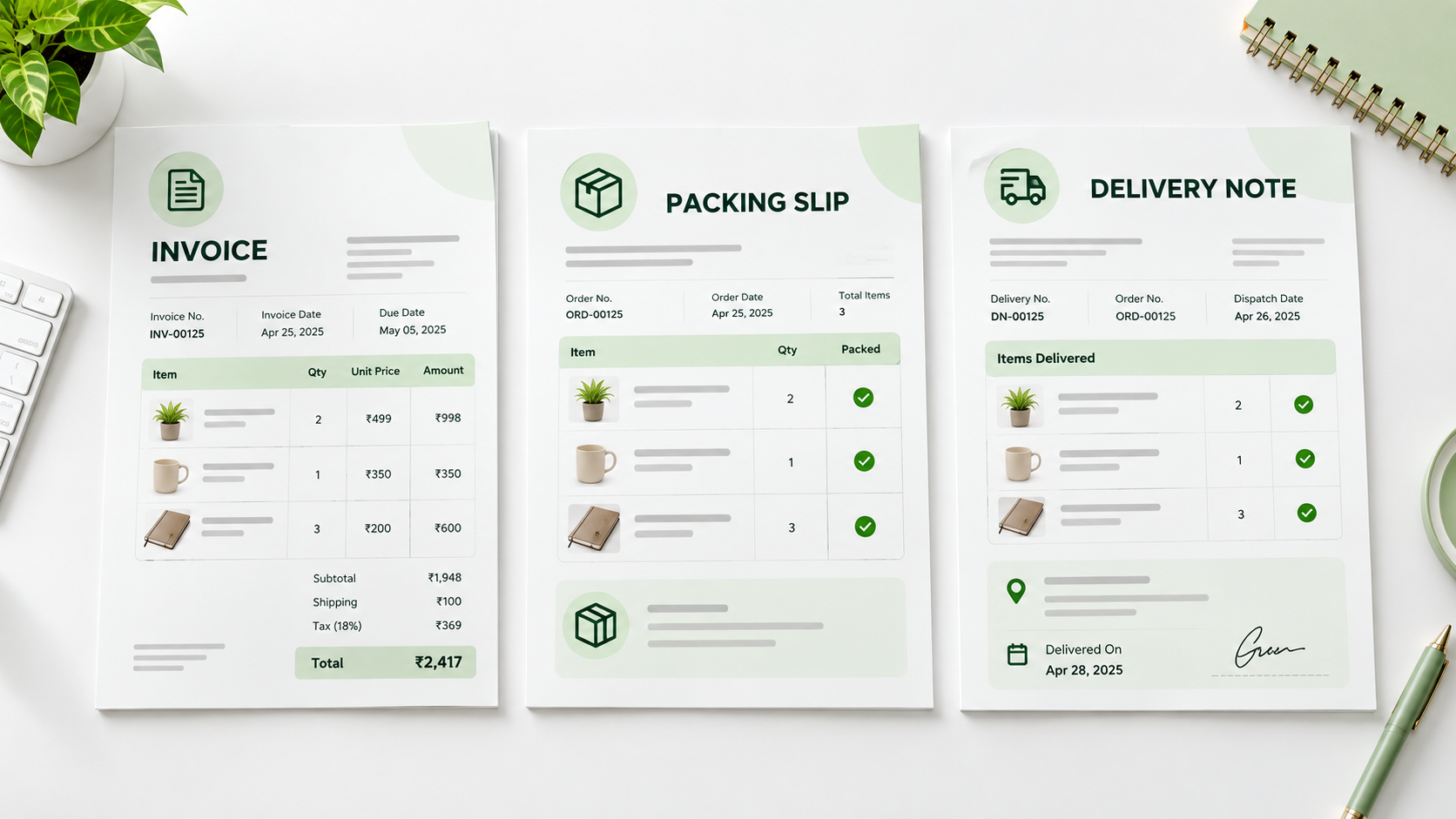
Packing Slip vs Invoice vs Delivery Note: What's the Difference?
Learn the difference between a packing slip, invoice, and delivery note, what each document is used for, what to include, and when you need them.
Recurring Invoices and Retainer Billing for Freelancers: A Complete 2026 Guide
For freelancers chasing stable, predictable income, retainer agreements are the gold standard — and the recurring invoice is the tool that makes them work. Instead of starting each month hunting new projects, retainer clients provide guaranteed work and guaranteed pay. But billing for a retainer cor
Why Your Invoicing Tool's Privacy Policy Is a GDPR Risk You Haven't Considered
Most freelancers choose an invoicing tool based on price or ease of use. Very few ask the more important question: where does my client data actually go? In 2026, with GDPR enforcement at record levels and data breaches increasingly targeting small businesses, the answer has real consequences.

France E-Invoicing Mandate September 2026: What Every Freelancer Must Do Now
France's long-anticipated e-invoicing mandate goes live on 1 September 2026. While large enterprises have been preparing for months, many independent freelancers and auto-entrepreneurs remain unaware that they will be affected—and that the deadline to receive structured e-invoices is just weeks away